Windows Explorer, you’ll be shown your network drives under 'This PC' (Windows 10).
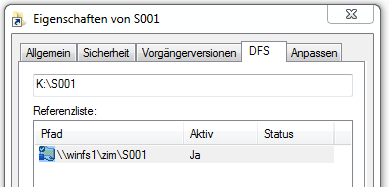
Are you not shown any path to your drive? Please click on the drive and then right-click on the desired folder (e.g. S001 or another abbreviation in your I: drive).
Now open the properties. The path will be displayed in the 'DFS' tab. The path can look like this, for example: \\winfs1\zim\S001.
In our example, the data stand for:
| Drive | Contents |
|---|---|
| H: drive | You personal storage area |
| I: drive | Shared storage area |
| Additional drives | Furthermore, special drives (such as ('Software'), additional shared drives, and shared drives and folders can be shown to you. |
If your data are already located on our new file server (WINFS1, WINFS2 or WINFS3), you’ll see two folders in your I: drive per department chair or institution: S001 and S001-S, for example.
In the online management of your ZIM ID, you can see what the abbreviation stands for in the section 'Information / Usage Regulation'. Click on the button 'Information / Usage Regulation' and log in with your ZIM ID.
In the line 'AD groups', you’ll see which facilities and services are assigned to you and what the abbreviation stands for. For example, S001 is the abbreviation for the Centre for Information Technology and Media Services.
You’ll find extensive information on different categories for security requirements in BSI-Standard 100-2: IT basic protection procedure (beginning on page 50). If you have questions, you can also contact the data privacy officer.
Overall, there are multiple servers to which the network drives are allocated. Our lists will tell you where your network drives are located. Users who have already converted to Outlook/Exchange will normally find their network drives in the new Windows servers.
| Server | Volume | Contents |
|---|---|---|
| WINFS1 | Grp1 | Shared drives |
| WINFS2 | Home | Personal drive for staff and students |
The network drives are all configured with a storage space restriction. If it’s necessary for your work, we would be glad to examine the technical feasibility of an expansion. Please send us the following information by e-mail (no form required):
As an alternative: Are you familiar with the cloud storage service LRZ Sync+Share?