A proxy is an intermediary communication interface in one network. It takes requests from one side, in order to forward them on the other side via its own IP address to the webserver requested. Our proxy is found automatically in most of the current browsers. If you want to be certain that you are actually using the proxy of the university, you can check this at http://www.heise.de/netze/tools/ip. If the IP address 132.231.51.111 is shown there, you are using our proxy.
WWW proxy that offers you optimal access to the university network. The direct internet connections have limited bandwidth for users of the campus network so that the office PCs here at the university are not 'braked'. Everything that passes via the proxy, however, is only limited by the bandwidth of the internet connection of the university, meaning that study-relevant tasks should run without problems.
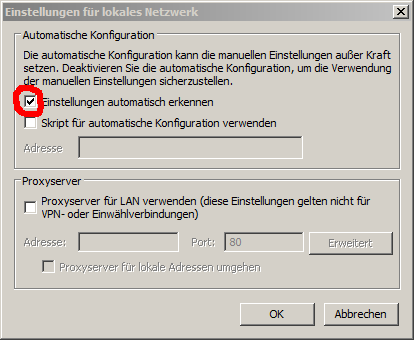
Select under 'Extras' or the gearwheel symbol, the point 'Internet options' and then select the tab 'Connections' in the dialogue box that appears. Click on 'LAN settings'. A new dialogue box 'Settings for a local network' (see Screenshot) appears. Click 'Automatically recognise settings'.
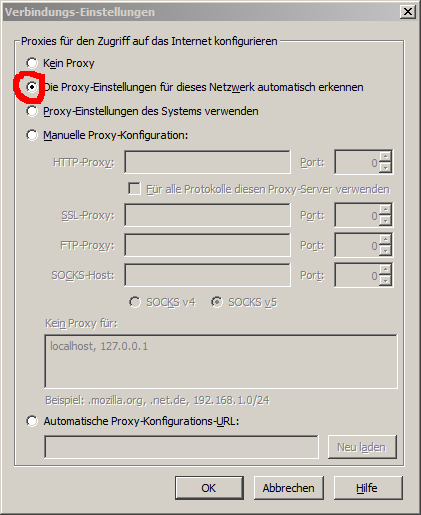
Select 'Extras -> Settings'. Click on the icon 'Advanced' and then on the tab 'Network'. Under 'Connection' click on 'Settings...'. A dialogue box 'Connections-Settings' opens (see screenshot): select 'Detect the proxy settings for this network automatically'.
This browser uses the proxy settings of Internet Explorer.
If the automatic method is not working or if you are using the wired access routes in the reading rooms of the University Library, you can also manually set-up our proxy.